
Most agencies do not lose margin because they lack one perfect software platform; they lose it because daily work is spread across too many touchpoints: inboxes, booking tools, accounting systems, CRM, control sheets, internal chats and manually sent documents. The result is an invisible cost made up of rechecks, duplicated handoffs and booking files that change owner without a shared view.
Why this matters urgently in 2026
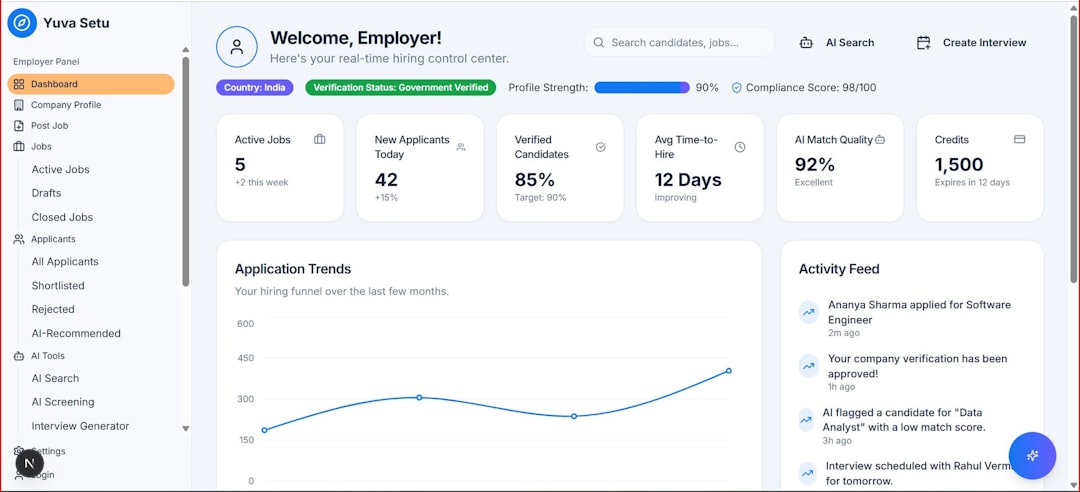
Photo by prashant hiremath on Unsplash
Over the last 18 months, operational pressure has increased on three fronts: more requests for customization, more last-minute changes and higher expectations for fast responses. At the same time, many agencies have added useful vertical tools, but without a true control point.
When systems do not talk to each other, every booking change generates manual micro-work: update the CRM, correct the dossier, resend documents, verify payments, notify the consultant, open a task for booking. At average volumes of 500-1,500 files per year, just 8-12 extra minutes per file are enough to burn dozens of hours each month.
An operations dashboard is not a new 'mega software' platform. It is a shared cockpit that brings the truly critical events into the same flow:
- new files to qualify
- booking changes to process
- documents to generate or regenerate
- payments and balances to check
- internal tasks with clear SLAs
- high-risk cases for error or delay
The point is not to see everything. The point is to see first what requires human action.
What should go into the cockpit, and what should not

Photo by Andrés Dallimonti on Unsplash
A common mistake is building dashboards full of commercial metrics that are almost useless for day-to-day work. An operational cockpit for agencies and tour operators must start from events, not reports.
These are the six families of systems that should feed it:
| Area | What it provides | Useful signals for the team |
|---|---|---|
| Booking/GDS or booking engine | file data, segments, changes, ticketing | new file, itinerary change, issuance, cancellation |
| Mid-office/back office | administrative status and data quality | incomplete files, amount mismatches, payment deadlines |
| CRM | commercial ownership and customer history | unattended leads, follow-ups, consultant notes, stalled opportunities |
| Itinerary builder/documents | customer-facing output and dossier consistency | documents to send, outdated version, missing attachments |
| Automation/workflow | rules and routing | automatic tasks, reminders, escalations |
| AI layer | summaries and priorities | file summaries, anomaly classification, next-step suggestions |
What should not go into the cockpit is just as important:
- data that does not change the work of the day
- dashboards built only for management, with no operational use for the team
- financial KPIs that are too aggregated to manage a single file
- notifications without an owner and without a deadline
If an alert does not produce an assignable action, it is noise.
The practical model: events, owners, SLAs, exceptions

Photo by Luke Chesser on Unsplash
The most effective structure is not 'one screen per department', but a single queue that can be filtered by event. In other words: first you see what happened, then who needs to act.
Here is a minimum model that works for leisure agencies, mixed corporate agencies and tailor-made tour operators.
| Operational event | Source system | Recommended automation | Owner | Internal SLA |
|---|---|---|---|---|
| New file acquired | booking/CRM | file creation + standard checklist | sales/booking | 30-60 min |
| Schedule or service change | booking feed/supplier email | automatic task + flag 'requires document review' | operations | within 2 hours |
| Balance due soon | back office | internal reminder + priority for near-term departure | admin/sales | 24 hours |
| Document not sent | itinerary/document system | alert if file is confirmed without final dossier | booking | same day |
| Unclassified customer request | email/CRM | AI summary + label by request type | customer service | 1 hour |
| File with inconsistent data | mid-office | phase progression blocked + correction task | operations | 4 hours |
| Departure within 7 days with missing elements | cross-system rule | automatic escalation | team leader | immediate |
This approach produces three concrete advantages.
First: it reduces rework. If a hotel change automatically generates a task for documents, payment and CRM notes, the team does not have to remember the steps from memory.
Second: it improves accountability. Every exception has a visible owner; the classic 'I thought a colleague was handling it' disappears.
Third: it makes AI useful. Artificial intelligence should not replace the consultant; it should compress reading time, classify exceptions and propose the next step.
Where AI really helps in operations
In travel, the problem is not generating text, but quickly interpreting scattered information. That is why the most productive use of AI inside an operational cockpit is much less 'creative' and much more procedural.
The four use cases working best are:
- summaries of supplier emails and confirmations in 5-7 operational lines
- automatic classification of incoming requests by urgency, topic and department
- detection of mismatches between the file, issued documents and administrative status
- generation of the recommended next action based on the file stage
In productivity terms, the benefit does not come from a single task, but from the cumulative effect. If a consultant or booking agent opens a file and already finds:
- case summary
- recent history
- open tasks
- documents to update
- administrative warnings
they work with fewer context switches and fewer memory-based errors.
A realistic benchmark, on moderately well-organized processes, is this:
- 20-35% reduction in initial request triage time
- 15-25% reduction in manual internal follow-ups
- 10-20% reduction in forgotten or late document regenerations
- improvement of 1-3 percentage points in the rate of files closed within the internal SLA
The limit not to cross: never leave decisions on policy, pricing, document compliance or customer instructions to AI without human review. In the cockpit, AI should suggest and prioritize, not approve.
Minimum architecture: without rebuilding everything from scratch
Many agencies block the project because they imagine a full system replacement. In practice, the most effective path is incremental.
The operations dashboard can start as a layer above existing systems, as long as three elements are clear:
- master record of the file
- standard progress status
- single event dictionary
1. Define the master record
You need one primary source to identify the file: file number, internal owner, departure date, segment, value, operational status. If these keys change from one system to another, the cockpit fails immediately.
2. Reduce statuses to a few readable steps
Many agencies have 20-40 statuses. Operationally, that is too many. Bring them down to 6-8 useful statuses, for example:
- qualified lead
- proposal sent
- confirmed
- documents in progress
- awaiting payment/balance
- ready for departure
- post-trip
- open exception
3. Standardize alerts
Every alert should have the same fields:
- event type
- severity
- owner
- deadline
- required action
- link to the file
4. Start with 5 workflows, not 25
The first automations to activate should cover most operational cases:
- new confirmed file
- service change
- balance due soon
- missing final documents
- customer request unanswered within SLA
5. Add AI only after the flow is organized
If the data is inconsistent, AI will only speed up the chaos. First clean up owners, statuses and checklists; then add summaries, classification and priorities.
The right KPIs to understand whether the cockpit is working
An operations dashboard should be measured with process indicators, not just revenue. The most useful ones are few and easy to review every week.
| KPI | What it measures | Range to keep under control |
|---|---|---|
| Average handling time | minutes between event and assigned owner | below 30-60 min |
| Files with exceptions open beyond SLA | buildup of operational risk | below 10-15% |
| Rework per file | average number of reopenings/duplicate tasks | to be reduced month over month |
| Documents regenerated after final send | quality of the booking-to-documents handoff | below 5-8% |
| Unclassified inbox | unassigned hidden work | close to zero by end of day |
| Files departing with open warnings | risk of error in a critical phase | zero or close to it |
The most interesting signal is not the total number of tasks, but the number of tasks that come back. When a file returns two or three times to the same point, the problem is rarely the person: it is the flow.
45-day implementation plan
To avoid long, abstract projects, it is better to work in short sprints.
Days 1-10: mapping invisible work
For 7-10 days, collect all cases of:
- files touched by more than two departments
- documents resent or corrected
- customer requests without a clear owner
- supplier changes processed late
- payments or balances missed at first check
Perfection is not the goal: the goal is to see where real friction begins.
Days 11-20: designing standard events
Create a catalog of 10-15 recurring operational events. For each one, define source, owner, SLA, action and closure condition.
Days 21-30: pilot on a single team or segment
Start with a limited scope: tailor-made leisure, SME corporate or groups. A pilot across 1-2 departments lets you fix taxonomies and rules before expanding.
Days 31-45: measurement and rollout
Measure only three things:
- minutes saved in initial handling
- reduction in repetitive manual tasks
- decrease in exceptions left open beyond SLA
If these three indicators improve, the cockpit is generating real productivity, not just a prettier dashboard.
FAQ
Does an operations dashboard replace CRM and back office?
No. It coordinates them. CRM, the booking system and back office remain the systems of record; the cockpit is there to surface events, priorities and accountability in a single operational view.
Where should you start if the agency uses many different tools?
Start from the exception flow, not software replacement. First identify the 5 situations that currently cause the most delays or rework; then connect only the data needed to manage them well.
Is AI useful for small agencies too?
Yes, if used for email classification, file summaries and task prioritization. Even teams of 3-8 people benefit when they reduce reading, routing and copying of information.
What is the most common mistake in projects like this?
Building dashboards for the owner rather than for the people working the files. If the operations team does not use the view every day to make decisions, the project remains reporting and never becomes productivity.
How long does it take to see real impact?
On a well-scoped pilot, the first signals appear in 4-6 weeks: fewer duplicate tasks, fewer unclassified inbox items and better compliance with internal SLAs on departing files.